Most of what we write about Relay, our workflow automation platform, is about the canvas: triggers, AI steps, approvals. This post is about something smaller and more basic. A customer sends a WhatsApp message to the business. Does it reach a person, and can that person answer from the same place the workflows run?
On 6 November we checked that on our own Relay workspace, CompCode Solutions, connected to the WhatsApp Cloud API. This is that path, in the order it happened, with nothing added.
1. The customer sends a message
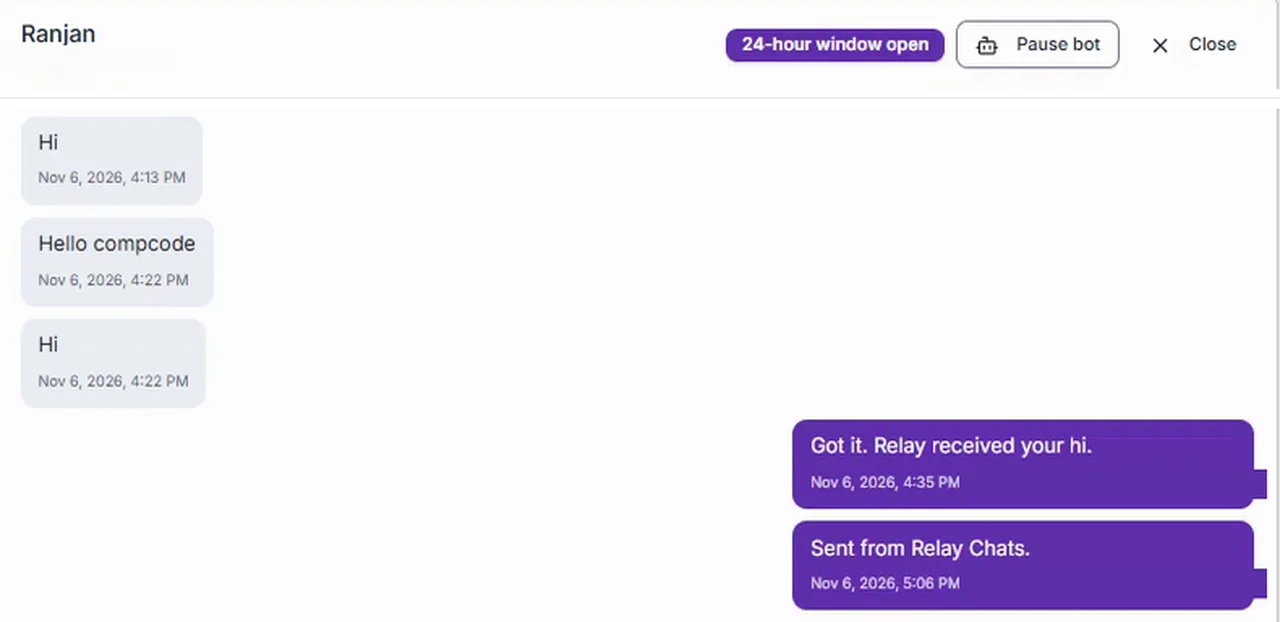
A contact sent "Hi" to the business number on WhatsApp. WhatsApp passed the message to Relay's webhook, the webhook answered HTTP 200, and Relay stored the message. Earlier lines from the same contact, another "Hi" and a "Hello compcode", were already in the thread.
The message is stored as part of a conversation with that contact, so the next screen can show it in context rather than as a single line with no history.
2. It shows up in Chats
Relay has a Chats screen for WhatsApp conversations. In the CompCode Solutions workspace the thread appears in the list with the contact's name, and opening it shows every message in order, inbound on the left and outbound on the right, each with its time.
At the top of the thread Relay shows "24-hour window open". That matters on WhatsApp: a business can reply freely within 24 hours of the customer's last message. Seeing the window state next to the conversation means the person answering does not have to work it out.
3. A person replies in the thread
The reply was typed straight into the thread: "Got it. Relay received your hi." There is no separate tool to open, no copy and paste into a phone, and no need to know the customer's number. You read the conversation and answer under it.
Relay sent that reply through the WhatsApp Cloud API, the official route for businesses, and stored it in the same thread at 4:35 PM.
4. WhatsApp reports it delivered
A send is not the end of the story; a delivery is. WhatsApp reports back what happened to each message, and Relay records it against the message. For this reply the record shows a WhatsApp message id and the status delivered.
That is the point of the whole exercise. When a customer later says "I never got your reply", the record says whether WhatsApp delivered it, and when.
What this is not
We would rather you trust a small, true claim than a big, vague one, so here is where this walkthrough stops.
- It is our own private workspace, not the public demo. The public demo workspace simulates every send so anyone can press Test safely. Real messages go out only from a workspace connected to a real provider.
- It ran on a WhatsApp test number. A test number delivers only to numbers on its allow list. A reply to a number outside that list fails, and Relay records the error WhatsApp returns against that message rather than marking it sent. A business going live uses its own approved number instead.
- No bot answered and no campaign was sent. Everything here is one person replying by hand. Chatbots, menus and template campaigns are a separate step that we will write about once we have run them end to end the same way.
Why start with something this plain
Any automated flow on WhatsApp, whether an order update, a booking reminder or an approval request, ends the same way when the customer writes back with a question: a person needs to see it and answer. If that hand-off is not solid, nothing built on top of it is. So we proved the hand-off first, on a real number, with a delivery record to show for it.
If you want the wider picture, the earlier post covers every integration point on the Relay canvas and where the AI steps sit. For the product itself, see Relay, and for what a setup involves, see how we set Relay up.