Most automation projects do not fail on logic. They fail on the edges: the order system that cannot send a webhook, the WhatsApp number nobody connected, the approval that still happens in someone's inbox. A workflow that covers four of five steps still leaves a person copying data across, and within a month the person is doing all five again.
So when we describe Relay, we start with what it plugs into. Everything below is a step you drag onto the same canvas, and unless it is marked as on request, it is in the live demo workspace today.
Triggers: how a workflow starts
A Relay workflow starts from one of seven triggers:
- Webhook: another system POSTs to the workflow's URL, authenticated with a bearer token or an
X-API-Key, and optionally signed with the workspace's HMAC secret. - Schedule: a recurring run while the workflow is active.
- Form: a public hosted form, so a workflow can take input with no website at all.
- Incoming Message: a customer replies on SMS, WhatsApp or email.
- RSS, Manual Start, and On Error, which starts when another workflow fails.
Channels: where the messages go
The messaging steps are SMS, WhatsApp (including approved templates), email with HTML, CC and BCC, push notifications, voice calls that read a message aloud, and a voice menu that waits for the caller to press a digit. Delivery runs through the workspace's own provider credentials. Until those are added, every message lands in a built-in sandbox outbox where you can read it in full, which is how the demo works: nothing leaves, and you still see exactly what would have been sent.
Apps and data: the glue in between
Slack, HubSpot and Stripe steps are built in, along with a generic App Request. For anything else there is the HTTP step: query, form or raw bodies, pagination and OAuth2. Deeper connectors, namely two-way CRM sync for HubSpot and Salesforce, Google Sheets, Gmail and Meta's WhatsApp Cloud API, are implemented and available for hosted customers on request.
Between the systems sit the data steps that make the joins work: Set Fields, Filter, Sort, Aggregate, Split and Dedupe for reshaping JSON; CSV, Files, an object store and a Data Table for storage; a read-only SQL SELECT; Date/Time, Hash, JWT, Markdown, HTML/XML and Compress; Find and Save Contact for the built-in contact book; Run Workflow for sub-workflows; and Respond, which returns an HTTP body and status to whoever called the webhook.
People are part of the plumbing too. The Approval step pauses a run until someone approves or rejects it in Relay's inbox, with an optional auto-approve threshold for small amounts. Wait for Event and Wait for webhook pause a run until another system says it may continue.
The three AI steps
AI steps are offered only in workflows marked AI-assisted. Rule-based workflows are a first-class type, and many good workflows need no model at all. When one does, there are three steps:
- AI Text drafts or rewrites text from a prompt: a reply, a summary, a structured brief.
- AI Classify sorts an input into categories you name, and each category becomes a path on the canvas.
- AI Agent answers from the workspace's own reference knowledge rather than from the open internet.
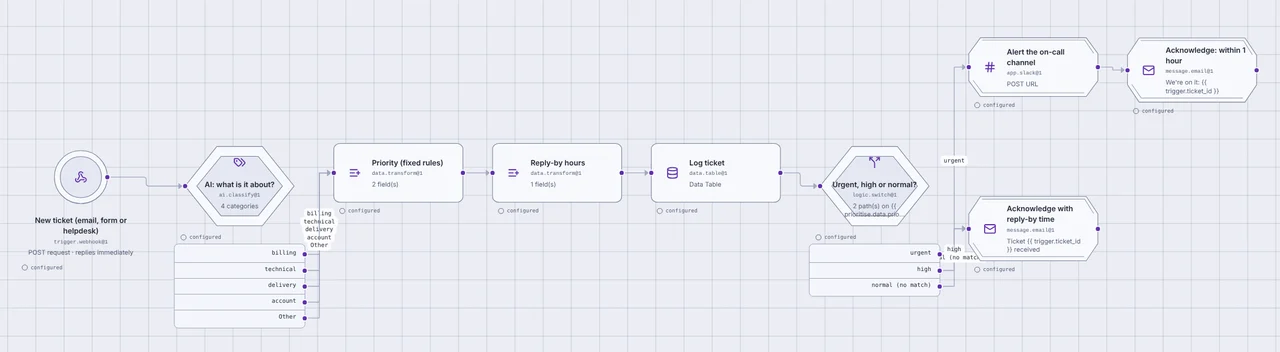
The support-ticket triage workflow in the demo shows why the second one matters. A new ticket arrives by webhook. AI Classify reads it and picks billing, technical, delivery or account, with an Other path for anything that fits none. From there, fixed rules take over: a priority, a reply-by time, a log row, and a switch that alerts the on-call channel for urgent tickets. The model makes one judgement; everything after it is ordinary, inspectable logic.
Models are reached through per-workspace model aliases, so a business can bring its own key for any OpenAI-compatible API. With no key set, the AI steps use a clearly labelled offline model, so a demo or a test run never pretends to be more than it is. Monthly AI token usage shows on the analytics page.
What a run looks like
Every run records, for each step, its input, its output, the path it took and how long it took. When a customer asks why they got a message, the answer is one click away: the trigger payload, the category the classifier chose, the approval and who gave it, the message that went out.
Before a workflow goes live you test it with sample data and read the same trace. Every published version is kept and can be restored in one click.
When Relay is not enough: a small custom site that calls your workflow
Sometimes the missing piece is not an integration but a screen: a form your customers fill in, a status page, an internal tool with your own fields. Relay's hosted form covers simple cases. For the rest, we build a small custom site whose only job is to collect input and show status, and it calls a Relay workflow for everything else.
The rule we hold to: the AI step stays inside Relay. The site never calls a model directly. That keeps the logic visible on the canvas and every AI decision in the run trace, next to the approvals and messages it led to.
The next version of ProdMint, our idea-to-proof-of-concept service, is being built exactly this way. The site is a form and a status page. When a founder submits an idea, the site sends it to a Relay webhook, signed with the workspace secret. In Relay, an AI Text step turns the idea into a short brief with three questions and returns it to the site, which checks it against a fixed schema before showing it; a brief that does not fit is refused, and Relay retries once before telling a person. Relay then emails the founder, waits for the answers with one reminder, puts the brief and answers in front of a reviewer as an approval, and sends the next step from that decision. The site holds no business logic, and every step of every idea is a readable run.
How to start
The quickest way to judge all of this is to use it. Open the demo workspace, sign in with the demo button, open the support-ticket triage workflow and press Test. No sign-up needed.
If you have a process with a messy edge, whether a system that needs connecting, a channel that is not wired, or a screen that does not exist yet, see how we set Relay up or tell us about it.